> For the complete documentation index, see [llms.txt](https://help.rbsgo.com/llms.txt). Markdown versions of documentation pages are available by appending `.md` to page URLs; this page is available as [Markdown](https://help.rbsgo.com/front-office-module/fo-analysis/faq-on-analysis/how-do-i-view-the-occupancy-forecast-report.md).
# How do I view the Occupancy Forecast report?
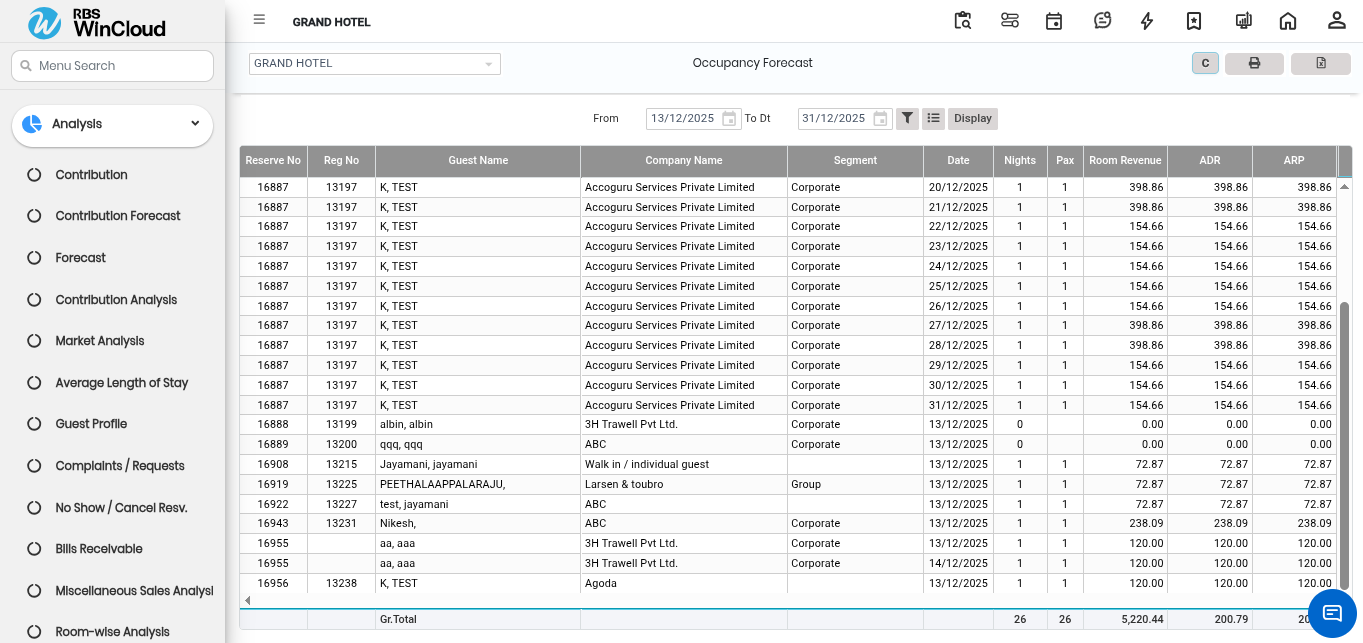
The **Occupancy Forecast** report is a forward-looking tool found within the **Analysis** section of the **Front Office** module. It is designed to provide visibility into future occupancy levels and anticipated revenue based on existing reservations, including those marked as tentative.
**How to Use and Customise the Report**
**Select a Date Range:** When viewing the report, you can select a specific period of future dates to analyse upcoming business.
**Include Specific Stay Types:** You can adjust the report to include Complimentary bookings, House Use, and Management bookings by selecting the **"With Compl/HU"** checkbox. Similarly, you can enable **"With Day Use"** to factor in day-use guest forecasts.
**Add Detailed Columns:** The **Options Filter** allows you to add specific columns to the report in a predefined sequence, such as Business Source, Segment, and Room Type, providing a more granular view of all future reservations.
**Filter and Sort Data:** The **Funnel Filter** is used to refine the results based on specific requirements, such as focusing on a single booking source or a specific Company or Travel Agent.
This report is essential for identifying potential high-demand periods and tracking the revenue to be generated from future bookings.
---
# Agent Instructions
This documentation is published with GitBook. GitBook is the documentation platform designed so that both humans and AI agents can read, navigate, and reason over technical content effectively. Learn more at gitbook.com.
## Querying This Documentation
If you need additional information that is not directly available in this page, you can query the documentation by asking a question.
Perform an HTTP GET request on the following URL with the `ask` and `goal` query parameters:
```
GET https://help.rbsgo.com/front-office-module/fo-analysis/faq-on-analysis/how-do-i-view-the-occupancy-forecast-report.md?ask=&goal=
```
`ask` is the immediate question: it should be specific, self-contained, and written in natural language.
`goal` is what the user is ultimately trying to achieve, the reason they need the answer. Sharing it helps GitBook give you a better, more relevant answer. A goal is most helpful when it describes the outcome the user wants rather than restating the question. For example, with `ask=how do I create an API token`, a goal like `automate deployments from our CI pipeline` lets GitBook tailor the answer to that use case.
The response will contain a direct answer to the question and relevant excerpts and sources from the documentation.
Use this mechanism when the answer is not explicitly present in the current page, you need clarification or additional context, or you want to retrieve related documentation sections.