> For the complete documentation index, see [llms.txt](https://help.rbsgo.com/llms.txt). Markdown versions of documentation pages are available by appending `.md` to page URLs; this page is available as [Markdown](https://help.rbsgo.com/front-office-module/fo-masters/faq-on-masters/how-do-i-specifically-configure-the-tab-sheet.md).
# How do I specifically configure the Tab Sheet?
The Tab Sheet is a highly versatile tool that serves as a single source for viewing all room-based postings and billings. To specifically configure it to meet your needs, follow these steps:
1. **Configure Revenue Columns (Masters)**
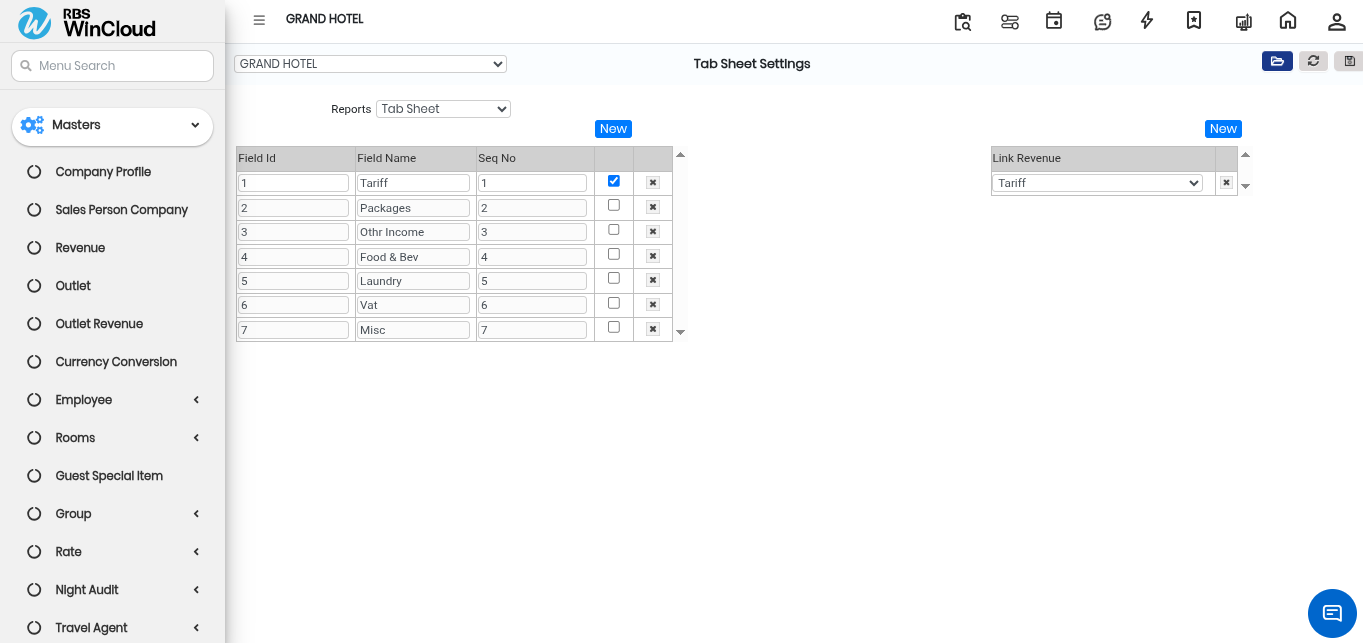
Before running the report, you must define which financial data you want to track. The Tab Sheet is built based on the "Tab sheet report settings" in the Masters section.
* **Add Revenue Heads:** You can add an unlimited (‘n’) number of columns corresponding to different revenue heads (e.g., Room Tariff, F\&B, Laundry).
* **Customisation:** These settings determine exactly which revenue streams are displayed as individual columns when you generate the report.
2. **Select a View Mode**
Once your master settings are defined, you can filter the report based on the status of the guest:
**Guest Summary:** Selecting this provides a report for a specific, user-selected period.
**Current Guest:** This filter isolates and displays only the guests currently in-house on the account date.
**Checked Out:** Use this to view data for guests who have already departed within a chosen period.
3. **Add Detailed Information Columns**
After choosing a view mode, you can further tailor the report by adding specific detail columns:
* **Personal and Stay Details:** You can include columns for the Guest name, Pax details, Company name, and other personal information.
* **Accounting Data:** For checked-out guests, you can specifically enable a column for "Brought Fwd. Amt." (Brought Forward Amount).
* **Instructions:** You can also choose to display reservation instructions within the report to provide context for specific billings.
By using these master settings and report filters, the Tab Sheet allows you to create a consolidated view of all financial transactions tied to a room.
---
# Agent Instructions
This documentation is published with GitBook. GitBook is the documentation platform designed so that both humans and AI agents can read, navigate, and reason over technical content effectively. Learn more at gitbook.com.
## Querying This Documentation
If you need additional information that is not directly available in this page, you can query the documentation by asking a question.
Perform an HTTP GET request on the following URL with the `ask` and `goal` query parameters:
```
GET https://help.rbsgo.com/front-office-module/fo-masters/faq-on-masters/how-do-i-specifically-configure-the-tab-sheet.md?ask=&goal=
```
`ask` is the immediate question: it should be specific, self-contained, and written in natural language.
`goal` is what the user is ultimately trying to achieve, the reason they need the answer. Sharing it helps GitBook give you a better, more relevant answer. A goal is most helpful when it describes the outcome the user wants rather than restating the question. For example, with `ask=how do I create an API token`, a goal like `automate deployments from our CI pipeline` lets GitBook tailor the answer to that use case.
The response will contain a direct answer to the question and relevant excerpts and sources from the documentation.
Use this mechanism when the answer is not explicitly present in the current page, you need clarification or additional context, or you want to retrieve related documentation sections.