> For the complete documentation index, see [llms.txt](https://help.rbsgo.com/llms.txt). Markdown versions of documentation pages are available by appending `.md` to page URLs; this page is available as [Markdown](https://help.rbsgo.com/front-office-module/fo-nightaudit/fo-nightaudit-nareport.md).
# Night Audit Report
Steps to view night audit report
### **Night Audit Report**
The Night Audit Report shows you the revenues generated in the Revenue Centres (Outlets/Facility/Rooms) with Collections and City Ledger settlements of the day. This happens only when you close the accounting date for a previous day.
**Revenue:**
.png?alt=media)
**Collection:**
.png?alt=media)
The Night Audit Report will feature the Revenue names and options as follows : today’s (closed day), Month till date and Year till date Sales as default.

In “Particulars” column the Revenue Main Groups are **Bold** and below this are Sub-Group which is Revenue Heads are given.
.png?alt=media)
In All three columns of Today’s, Month till date (MTD), and Year till date (YTD) Sales and Collections, there are three sub-division of columns.
**Amount**: Which shows the total revenue/ collection generated.
**Allowance**: Allowance (if any) against the Revenues.
**Net**: Net Amount after Allowance (Amount- Allowance= Net).
By Default this report will generate the data of the last closed day (as today’s column). If you want to see a cumulative amount of a **specific period** you will have the filter to generate a “**From and to” report.** This gives a collective amount report against the revenues generated within that period

The user, by selecting **Datewise** will get the report for each date from the selected date range as shown below.

“Net Revenue” check box provides an additional row of Net Revenue generated.
.png?alt=media)
**Last Year Comparison:** A filter is provided to see the comparison of Revenues and Collections generated for Today’s date, MTD and YTD with Today’s date Last Year, MTD LY and YTD LY which gives an insight on the business to the management.

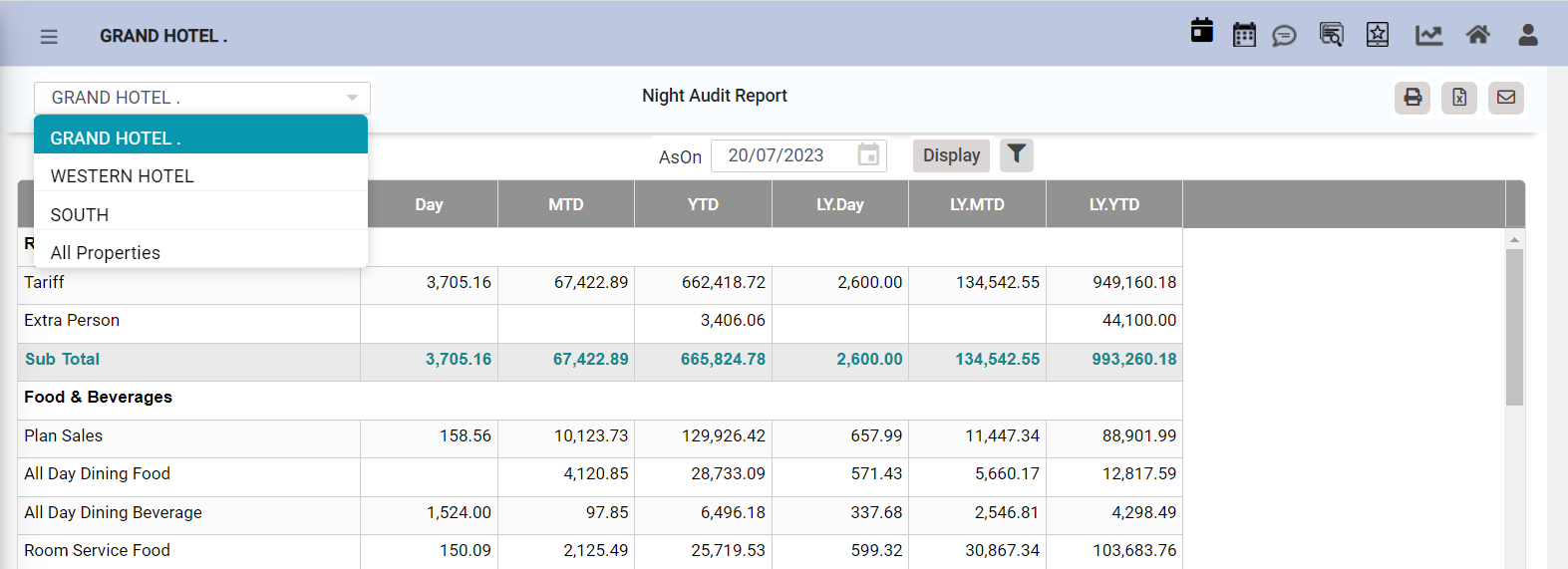
The user can also view the Night Audit Report for **Multi-Property** by selecting the property from top left hand side, as shown below. Also by selecting **All Properties,** the system provides a consolidated reports inclusive of all properties.
**Excess/Shortage:** It means any kind of discrepancy in Revenues and Collections not matching, it shows in the very last row of the NA report which can show because of usually one reason
.png?alt=media)
Revenues not linked properly in the NA Master. This issue can be easily resolved and doesn’t change any data it just displays the missing data and removes the excess/shortage amount.
**Note:** Excess/Shortage row must always show ‘0’ amount.
---
# Agent Instructions
This documentation is published with GitBook. GitBook is the documentation platform designed so that both humans and AI agents can read, navigate, and reason over technical content effectively. Learn more at gitbook.com.
## Querying This Documentation
If you need additional information that is not directly available in this page, you can query the documentation by asking a question.
Perform an HTTP GET request on the following URL with the `ask` and `goal` query parameters:
```
GET https://help.rbsgo.com/front-office-module/fo-nightaudit/fo-nightaudit-nareport.md?ask=&goal=
```
`ask` is the immediate question: it should be specific, self-contained, and written in natural language.
`goal` is what the user is ultimately trying to achieve, the reason they need the answer. Sharing it helps GitBook give you a better, more relevant answer. A goal is most helpful when it describes the outcome the user wants rather than restating the question. For example, with `ask=how do I create an API token`, a goal like `automate deployments from our CI pipeline` lets GitBook tailor the answer to that use case.
The response will contain a direct answer to the question and relevant excerpts and sources from the documentation.
Use this mechanism when the answer is not explicitly present in the current page, you need clarification or additional context, or you want to retrieve related documentation sections.